


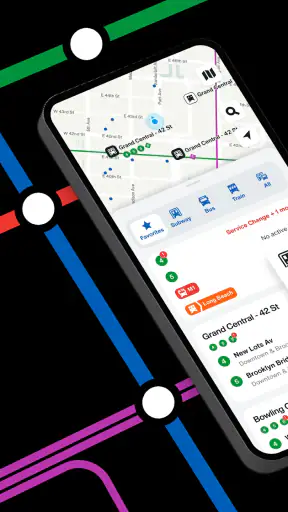
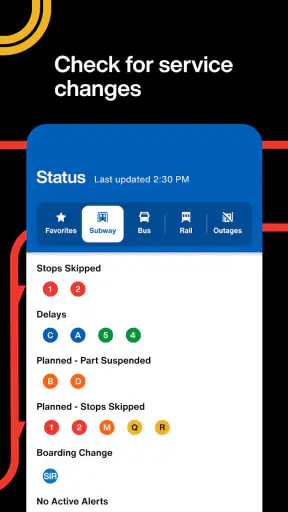
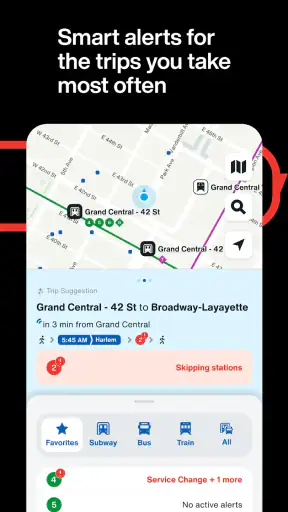
When I am moving around New York, the most useful thing a transit app can do is answer one immediate question: when is the next train or bus actually coming? The Official MTA App focuses on that need rather than trying to become a general travel planner. It is a free Travel & Local app from MTA, the Metropolitan Transportation Authority, built around live transit updates and real-time arrival information for subways and buses.
That narrow purpose is also its main appeal. I do not open it because I want restaurant suggestions, walking tours, or a broad city guide. I open it when I am standing near a station, waiting at a bus stop, or deciding whether I can afford to leave a meeting now. In those moments, a current arrival estimate is more useful than a timetable that assumes everything is running normally.
The app is available to Everyone and has passed the one-million-install mark, so it is clearly aimed at everyday riders rather than a small group of transit enthusiasts. Its average rating is 3.1 from around 7,500 ratings, with roughly 2,500 written reviews. That mixed reception is worth taking seriously: the central idea is practical, but real-time transit information is only as reassuring as its accuracy, clarity, and performance when a trip is already stressful.
Real-time arrivals are the reason to keep it installed
The capability that matters most
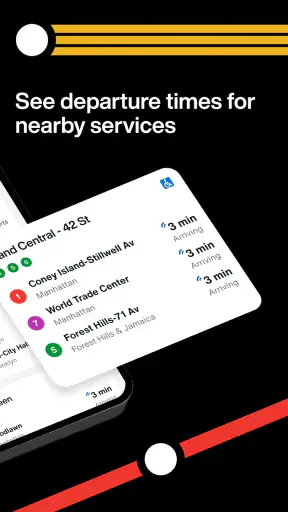
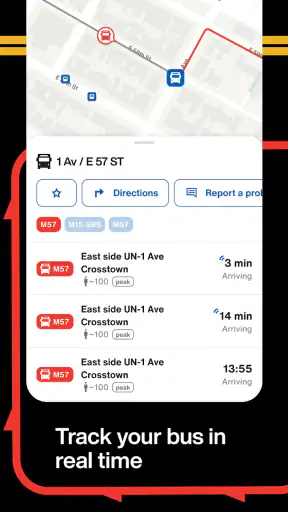
The strongest part of the experience is the ability to check live arrival information for MTA subway and bus service. In my experience, this changes the way I make small travel decisions. Instead of walking toward a platform or stop and hoping the next vehicle is close, I can check first and choose whether to wait, walk, or adjust my departure.
That sounds simple, but the practical difference is important. A scheduled arrival tells me what should happen. A live update helps me judge what is likely to happen now. For a rider who has a connection to make, a child to pick up, or an appointment across town, that distinction can prevent wasted time.
I also like that this capability serves two different kinds of trips. For a familiar commute, it can confirm whether leaving home immediately makes sense. For an unfamiliar journey, it gives me a quick reality check before I commit to a station entrance or bus stop. The app is most valuable when I use it as a decision tool, not as something I stare at continuously.
The key benefit is not knowing the entire city; it is reducing uncertainty during the next few minutes of a trip. That is a more modest promise than replacing every other navigation tool, but it is a useful one.
What checking an arrival is like in practice
I would use the app in stages. Before leaving, I check the relevant service and see whether the next arrival looks close enough to shape my departure. Once I am on the way, I check again near the station or stop, especially if traffic, crowds, or a delayed connection could change the best choice.
This workflow is better than opening the app repeatedly without a plan. Live information can change, and an estimate is not a guarantee that a vehicle will arrive exactly when shown. I treat the displayed time as a current indication, then leave enough room for the ordinary friction of city travel: reaching the platform, finding the correct entrance, crossing a busy street, or waiting through a crowded boarding process.
For buses, the information is particularly useful when I am deciding whether to remain at a stop. A short wait may be sensible if a bus is approaching, while a long or uncertain wait may make walking to another option more attractive. The app cannot remove traffic or crowding, but it can give that decision a better starting point than guesswork.
For subways, the value is slightly different. I am less likely to change my entire route because of one arrival estimate, but I can use the information to decide whether rushing to a platform is worthwhile. If the next train is not close, I may have time to enter through a different station entrance, check the line direction, or avoid sprinting down stairs.
A realistic everyday trip
Imagine I finish work later than expected and need to cross the city. I am already outside, so I do not need a long explanation of New York’s network. I need to know whether the nearby bus is worth waiting for or whether I should walk toward the subway. I open the MTA app, check the current arrival information, and compare that immediate option with the time and effort of reaching another stop.
If the bus is close, waiting may be the sensible choice. If the estimate is much farther away, walking becomes more appealing. If I am meeting someone, I can also send a more realistic arrival expectation instead of relying on a printed schedule. The app does not make the decision for me, but it supplies the one piece of information most likely to affect it.
On a rainy day, that small advantage becomes more meaningful. I would rather know whether I am facing a short wait before staying beside an exposed stop. In the same way, someone carrying luggage may prefer to wait for a nearby bus rather than walk several blocks to a subway entrance. The best use is not always the fastest theoretical route; sometimes it is the option that fits the rider’s actual condition.
Small habits that make the live information more useful
My first tip is to check the direction and stop carefully before acting on an arrival. In a dense transit network, two stops with similar names can lead to completely different journeys. A live time is only helpful when it belongs to the service I actually need.
My second tip is to use the app immediately before a meaningful decision, rather than treating an earlier check as permanent. Conditions can change between leaving home and reaching the station. A quick refresh near the point where I must choose between waiting and walking gives the information more practical value.
My third tip is to keep a backup thought in mind. If the app shows a nearby arrival, I still consider what I will do if that vehicle is crowded, delayed, or not suitable when it arrives. Real-time information improves planning, but it does not turn public transportation into a controlled environment.
A fourth useful habit is to combine the app with local knowledge instead of expecting it to replace it. If I already know that one station entrance is easier to reach or that a certain bus stop is uncomfortable at night, I use the arrival information alongside that knowledge. The fastest displayed option is not automatically the best personal option.
Where the focused approach helps, and where it does not
The app’s focus is a strength when I already know roughly where I am going. It gets me closer to the live status of MTA subway and bus service without surrounding the task with unrelated travel content. That makes it suitable for regular riders who want a direct transit check.
It is less convincing as my only tool for discovering a complicated journey. If I am unfamiliar with the city, need detailed walking directions, or want a broad comparison of transportation modes, a full navigation app may be more convenient. Those services often combine route planning, maps, walking instructions, and destination search in one place. The Official MTA App is better understood as a transit-specific companion than a universal map.
That distinction also affects visitors. Someone staying in New York for a short time may appreciate official live service information, but may still need another app for hotel-to-attraction directions and neighborhood navigation. I would not install this expecting it to answer every travel question. I would install it when MTA arrival information is the question I ask most often.
Tradeoffs behind the convenience
The first tradeoff is that live information can create false confidence if I read it as a promise. An arrival estimate may help me choose, but it cannot guarantee a smooth boarding experience or a seat. I still plan with a little flexibility, especially when the trip is important.
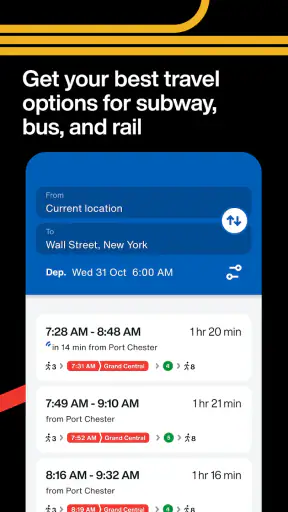
The second is that a focused transit app may require more effort from me than a broad route planner. I may need to know the line, direction, or stop I want before the arrival screen becomes useful. That is not a flaw in the live-data idea, but it means the app feels more natural to a rider who understands the local network.
The third is the mixed user satisfaction reflected in its 3.1 average. I would not dismiss the app because of that figure, since a transit tool can be extremely helpful on one trip and frustrating on another. Still, it is a reminder to keep expectations realistic. The app’s value depends on timely information and a clear enough experience when I need it quickly.
There is also a psychological tradeoff. Checking live arrivals can reduce uncertainty, but repeatedly refreshing can make a delayed journey feel even more stressful. I get the best results when I check, make a decision, and then allow for normal transit variability instead of watching every change.
How it compares with the usual alternatives
Compared with a printed schedule, the MTA app is more useful for immediate decisions because it is designed around current conditions rather than an ideal timetable. A printed schedule can still be handy for learning a routine, but it does not give me the same confidence when service is not running normally.
Compared with a general mapping app, this app has a clearer transit identity. A mapping service may be better for door-to-door directions, walking navigation, and comparing several travel modes. The MTA app makes more sense when I want to check the transit operator’s own subway and bus information without turning the task into a full route-planning session.
Compared with simply waiting at the stop, the app gives me a reasoned choice. I can decide whether the wait is acceptable, whether I should walk, or whether I need to warn someone that I may arrive later. That is a small improvement, but it is exactly the kind of improvement I notice during repeated commutes.
Who benefits most from installing it
Regular MTA riders gain the most. If I use New York subways or buses several times a week, the ability to check live arrivals can save repeated guesswork. Commuters, students, service workers, and anyone whose plans depend on arriving close to a particular time are the natural audience.
It is also useful for people who do not travel at predictable hours. A fixed schedule is less helpful when I leave work late, finish an appointment early, or change plans during the day. Live information supports those flexible trips because it reflects the moment when I actually need to move.
Visitors can benefit too, particularly if they already know their destination and mainly need confidence about the next subway or bus. I would pair it with a broader map if I were navigating unfamiliar streets, but I would still consider keeping it available for the transit-specific part of the journey.
People who should skip it are those seeking a complete travel assistant rather than live MTA information. If I mainly need walking directions, attraction planning, or a single app that coordinates every stage from an unknown address, another navigation tool may fit better. Installing this one will not remove the need for judgment or local awareness.
Practical details and long-term value
The app is free, which removes the main barrier to trying it. It is listed for devices running Android 7.0 or later, and the current version is 4.21.0. MTA is the developer, so the app has a direct connection to the transit system it represents rather than being a third-party city guide built around several unrelated services.
Its release history reaches back to July 2, 2018, while its continued presence and more than one million installs suggest that it has remained relevant to a substantial number of riders. I would not choose it for the install count alone, but that scale makes sense for an official tool serving a large metropolitan transit network.
The Everyone age rating also fits the app’s purpose. It is a practical utility for ordinary travel, not entertainment aimed at a particular age group. I can recommend it to a family member who needs subway or bus arrival information without treating it as a specialist product.
My recommendation after using it
I see the Official MTA App as a useful, deliberately focused companion for New York transit. Its best feature is not a long list of extras; it is the ability to check live subway and bus arrivals when a schedule alone is too abstract. That makes everyday choices easier, especially when I am deciding whether to wait, walk, leave now, or adjust expectations.
I would keep it installed if I regularly use MTA service. I would also recommend it to a visitor who wants official transit information, provided that person is willing to use a separate map for broader navigation when necessary. The app is not the right replacement for every travel tool, and its mixed rating cautions against expecting perfect certainty from changing transit conditions.
For me, the deciding question is simple: do I often need to know what is arriving next? If the answer is yes, this free app earns its place because it turns a vague wait into a more informed choice. If the answer is no, or if I need complete door-to-door guidance, a general navigation app may be the better single download.


